
You found yourself in a situation where you already created your Shipment Document(ASN) and printed the GS1-128 Labels, but the Retailer is now sending you a Change(EDI 860) or a Duplicate Order(Revised EDI 850).
You need to find out what kind of change they are attempting to make. I’ll show you two scenarios here.
Date Change Scenario:
Dates are for informational purpose only. As long as both parties are aware of the date change, you may continue to work with your Original Order. It is safe to close your Changes at this point. You may proceed to your Inbox > New Changes then follow step-by-step instructions below.
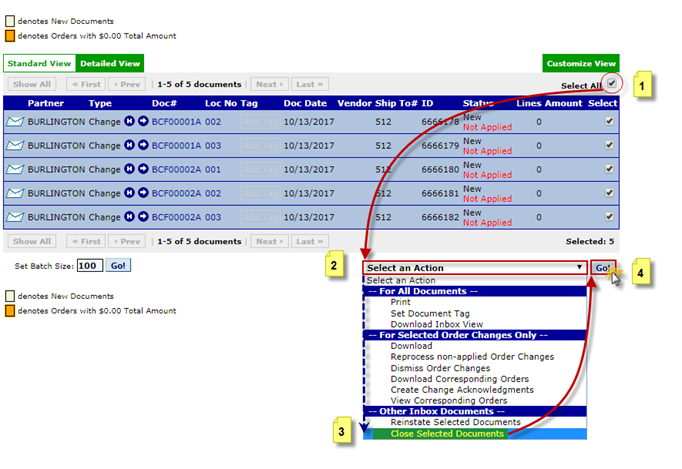
The following pop-up will appear:
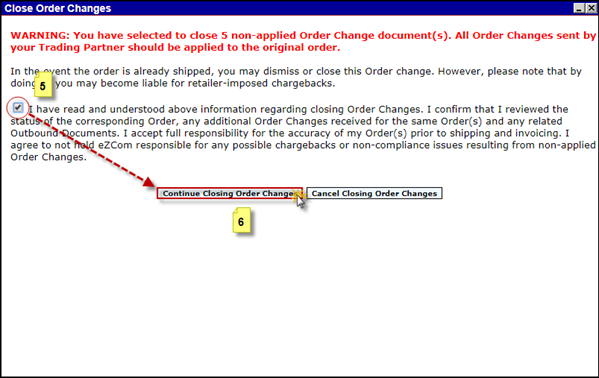
Your Changes are now closed and you can process your Orders as you normally would.
Quantity Increase/Item Detail Change scenario:
In this case, the Change will need to be applied. In order to apply your Non-Applied Changes or load your Duplicate Orders, you must delete all the outbound documents that may be open against these Orders. The Changes may be applied now and/or Duplicate Orders loaded.
